Showing posts with label Drupal. Show all posts

Tuesday, May 15, 2012

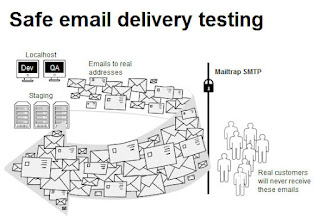
Using a Test SMTP Server For Local Drupal 7 Email Testing

I don't usually require testing email notifications and other email related functions during local site development using Drupal, but there are times when you really need to test how, when and to whom emails are being sent to.

I use Uniform Server for local development, but this should apply to any WAMP install, as it uses just 2 things:
  1. First, the SMTP module
  2. Second, an account in mailtrap.io
For those who are wondering why one should use mailtrap instead of just connecting to hotmail, yahoo or gmail accounts, reasons are:
  • Most email providers will require you to connect via SSL / TLS
  • and will also try to block you believing you are trying to send out spam
Steps
  1. To get SMTP functionality, install the SMTP module
  2. Once you have installed the module, it will require you to input SMTP details. This is where mailtrap.io comes in.
  3. Create an account in mailtrap.io. Once you sign up, you'll receive a confirmation email in your inbox.
    Confirm your email
  4. Go back to mailtrap.io and create an Inbox
  5. Once an Inbox is created, you'll be given SMTP details that you can use
  6. Copy over to the SMTP module configuration page the SMTP details like SMTP Server, Username, Passwords, etc.
  7. Save, and test.

Friday, February 24, 2012

Internal Server Error After Migrating a Drupal Site to Go Daddy

Scenario


You have your main domain in Go Daddy with a hosting account linked to it. You either have another domain or subdomain that you want to host on the same hosting account, so you go ahead and create a new subdirectory, and migrate your Drupal files into the newly created directory folder. Once the database has been imported and settings.php updated with the database details, you go to your site, is able to access the home page, but no other page is accessible - you get an Internal Server Error on any page that you try to open, even logging in ( from the home or front page ) gives you the same error.


Solutions to try


If Subdomain

On the root of your Drupal folder, look for the .htaccess file. Download to your local drive and open in a text editor, and uncomment the line:

RewriteBase /

See image below.


If on a Subdirectory

If you are not using a subdomain, but just a subdirectory, try uncommenting the line:

RewriteBase /drupal

Replace /drupal with the name of your drupal directory. See image below.


After saving the file, upload back to your server. Test and see if the change in .htaccess resolved the issue.

Wednesday, June 29, 2011

Stop Simplenews from sending out a newsletter ( Drupal )

This tip is for people using Drupal and a module called Simplenews for maintaining and sending out newsletters to an email list.

There might come a time when you need to stop simplenews from sending newsletters - maybe because of issues with the module or the Drupal site, or you accidentally sent the wrong newsletter to a certain list of users. Whatever the reason, below is a quick way of stopping Simplenews.

  1. Backup your database first. You can use a module called Backup and Migrate to do so.

  2. Open phpMyAdmin, and look for under your Drupal site's database the simplenews_newsletter table.

  3. Determine the node id of the newsletter you are sending ( going into the edit page would show you the node id on the url ). Look for that node id on the simplenews_newsletter table, and click on the edit button on the left of the row ( pencil icon ).

  4. Change the s_status from 1 ( which means sending ) to either 0 ( unsent ) or 2 ( sent ).

  5. Empty the simplenews_mail_spool table ( this is where all the email addresses and status per message is stored ).

    You can use TRUNCATE to do this, as in the code below:

    TRUNCATE TABLE simplenews_mail_spool