Showing posts with label Web. Show all posts

Tuesday, May 15, 2012

Using a Test SMTP Server For Local Drupal 7 Email Testing

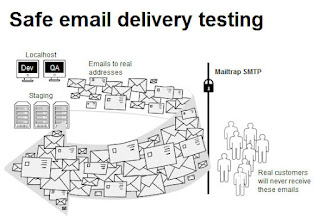
I don't usually require testing email notifications and other email related functions during local site development using Drupal, but there are times when you really need to test how, when and to whom emails are being sent to.

I use Uniform Server for local development, but this should apply to any WAMP install, as it uses just 2 things:
  1. First, the SMTP module
  2. Second, an account in mailtrap.io
For those who are wondering why one should use mailtrap instead of just connecting to hotmail, yahoo or gmail accounts, reasons are:
  • Most email providers will require you to connect via SSL / TLS
  • and will also try to block you believing you are trying to send out spam
Steps
  1. To get SMTP functionality, install the SMTP module
  2. Once you have installed the module, it will require you to input SMTP details. This is where mailtrap.io comes in.
  3. Create an account in mailtrap.io. Once you sign up, you'll receive a confirmation email in your inbox.
    Confirm your email
  4. Go back to mailtrap.io and create an Inbox
  5. Once an Inbox is created, you'll be given SMTP details that you can use
  6. Copy over to the SMTP module configuration page the SMTP details like SMTP Server, Username, Passwords, etc.
  7. Save, and test.

Monday, May 30, 2011

Creating a database in iWeb's PanelBox

iWeb is a Canadian web hosting company that offers shared hosting, managed and unmanaged dedicated servers and colocation.

What is PanelBox?

PanelBox is custom cPanel interface used by iWeb for its hosting accounts.

Creating a database

  1. To create a database in PanelBox, first login to your account. The default url would be /cpanel.

  2. Under General Options, click on Database.

  3. Select whatever Database you want to setup > either MySQL or PostgreSQL. For this guide, we'll be using MySQL.

  4. Name your database and click on "Create Database".

    New Database

  5. Now you need to create a user for the database you just created. Hover again over MySQL, and select "Add new user".

  6. Name the user, and give a strong password. Click "Create User" to proceed creating a new database user.

    New User

  7. Next step is to add the user you created to the database, hover over MySQL and select "Add User To Database".

  8. On the Add User To Database page, select the user and database you created and hit "Submit".

  9. Manage User Privileges page should appear next, check "All Privileges" and then click on "Make Changes".

Now that you have setup the database, you should be able see it under MySQL > Current Databases.

Monday, October 12, 2009

Understanding robots.txt

Matt Cutts, head of Google's Webspam team, presents and discusses how Google handles the robots.txt file. Watch the video below, follow and share comments on Matt's blog or discuss the video on YouTube.


Resources

  1. Robots exclusion standard ( Wikipedia )
  2. Block or remove pages using a robots.txt ( Google webmaster tools )
  3. Robot Control Code Generation Tool
  4. Search Engine Optimization 101 ( Nettuts )

Sunday, October 19, 2008

Convert Documents to PDF with the Document Converter Express

Neevia Document Converter eXpress is a very handy online tool for converting your documents to other file formats right on the browser. I tested and used it for converting PNGs to PDFs, and the conversion process was fast and completed without any problems. I used the "Wait for conversion in browser" option, but you can also specify an email address and have the link to the download page emailed to you instead. The file size limit for uploads is 1 MB.

The supported Output formats are:

  • PDF
  • PDF/A
  • PostScript
  • EPS
  • BMP
  • JPEG
  • TIFF
  • PCX
  • PNG
  • GIF

Neevia Document Converter eXpress is a free online tool, but the company also offers paid desktop programs for creating and modifying PDFs.

Link: Neevia Document Converter eXpress

Thursday, November 15, 2007

Marvel Comics offers free issues online

Marvel Comics now offers free back issues of familiar titles like X-Men and Spiderman. The digital editions could be viewed online and there are no options to download. The viewer has a pretty decent interface, and has options for different viewing modes, has a zoom function, and usable next / previous buttons.

Link to complete list of free issues.

Updated link to list of free issues( January 14, 2024 ).