Showing posts with label Software. Show all posts

Thursday, February 16, 2012

Focus and Track Time with Tomato Doer

Most of us spend our days trying to manage the time that we spend on different tasks, whether its work related or personal chores. Managing time and getting us to focus on whatever we are doing is one of the goals of the Pomodoro Technique, something that you should try if you want to improve your own time management and focus.


There are various tools that you can use to follow the Pomodoro technique, the most simplest being pen and paper. One application that I have found and am currently using is Tomato Doer. It’s portable, keeps a log of your completed sessions and mostly stays out of the way – which is good so that it does not in itself affect your productivity.

You can read more about the Pomodoro technique here first, then try out the tool by downloading it from Sourceforge. Tomato Doer requires Microsoft .NET 4.0 Framework.

Friday, June 24, 2011

WinFF - Open Source Video Conversion Tool

WinFF is an open source GUI for the swiss army knife of video conversion - ffmpeg. Supports most of the codecs supported by ffmpeg including flv, avi, asf and wmv. Features a simple and easy to use interface, and can do multiple conversions at the same time.

Platforms

WinFF runs on Windows ( Windows 95, 98, NT, 2000, XP, Vista and 7 ) and Linux ( Ubuntu, Debian, Redhat and Suse ). There is also a portable version for Windows.

Resources

  1. WinFF Home
  2. WinFF Downloads
  3. FFmpeg Home
  4. FFmpeg General Documentation

Sunday, October 18, 2009

AVG 9 ( Free Edition ) now available for download

For PC users who are looking for an alternative free anti-virus software, and for those who are current users of AVG 8.5, the most current version of the popular free anti-virus is now available for download.

I just wished the "Game mode" feature was also a part of the free version, but I guess AVG still needs to keep features that will give users a reason to upgrade to the "Full" version.

Links

  1. AVG homepage
  2. AVG 9 features and comparison table
  3. AVG 9 download page

Sunday, July 12, 2009

Google to release a new Chrome-based OS in 2010

Google announced on July 7, 2009 that they will be releasing a new browser-based ( Google Chrome ) OS sometime in 2010 ( according to them, it will be in netbooks by the second half of the same year ). Google Chrome OS will be open sourced this year, so developers who will be working on it once it is in private beta, could give their hands-on experience on the current state of the OS at that point. According to the announcement, Chrome OS will be a light operating system, with a ( Google developed ) windowing system and the Chrome browser as the user facing application. Many are really excited with the announcement, but there is also a large camp who are really skeptical of how impactful this new OS will be. The hype around the new operating system is pretty strong, but the lack of information about the mysterious product maybe the only cause for this. Google is not alone in pursuing a web-centric OS, with Crunchpad and Intel's Moblin also having the same goals - to make machines that rely more on the network than on traditional desktop apps.

For further reading:

  1. Introducing the Google Chrome OS
  2. Google Chrome OS - FAQ
  3. Wikipedia entry for Google Chrome OS
  4. Google Chrome OS & What It Means For Future of Computing
  5. Chrome OS Could Offend the Open Source Community
  6. Google Chrome OS: Is It the End of an Era?

Thursday, June 26, 2008

Portable and Free eXpress CheckSum Calculator

I've been recently downloading Linux distros, through bittorrent and direct iso downloads, and one of the tools that I found very helpful in checking the validity of the files that I download is the eXpress CheckSum Calculator. You can match the values calculated by XCSC against the given and previously generated checksum values for files that you download online. The tool supports CRC32, MD5 and SHA-1. If you need to find the checksum for a group of files, you can also use another program from the same developer, the eXpress CheckSum Verifier (which is also portable and free).

Details :

Developer : Irnis Haliullin Cost : Free Supported OS : Windows 95/98/ME/NT4/2000/XP/Vista Supported algorithms : CRC32 (Cyclic Redundancy Code), MD5 (Message Digest number 5) and SHA-1 (Secure Hash Algorithm). Download Size : 263Kb ( Self-extracted EXE file )

Resources and Links

  1. Download eXpress CheckSum Calculator (XCSC) here
  2. Download eXpress CheckSum Verifier (XCSV) here
  3. CRC
  4. MD5
  5. SHA hash functions

Friday, June 20, 2008

Firefox 3 hits 8 million downloads in 24 hrs.

Firefox Download Day 2008

Congratulations to Mozilla and the Firefox team for the very successful Firefox Download Day and being just a step away (awaiting confirmation) from a Guinness World Record for the most software downloaded in 24 hours. The total downloads after 24 hours totaled around 8 million, with almost the whole civilized world joining the download spree, and the United States topping the list of countries with completed downloads. As a side note, Opera also released the version 9.5 of their desktop browser last June 12, which also had great reviews and buzz going around, getting downloaded 4.7 million times for the first five days after it was launched. The great numbers of downloads for both browsers in such a short span of time will definitely affect the current Usage Share of web browsers ( Firefox has 17.76% usage share, while Opera has 0.69%, as opposed to the 74.83% of Internet Explorer - As of April 2008 ) cutting more into the considerable piece of the pie commanded by Internet Explorer.

I've been using Firefox 3 ever since downloading and installing it on my main system, and I must say it runs much faster, with I believe the memory leak issues in the past being resolved in the current version. I still see spikes in memory usage, but it is much lower than Firefox 2, which really became a memory hog with like email, some web apps, and a few more tabs open. I've read mixed reactions to the Smart Location Bar ( also known as the "Awesome Bar" - this feature is an autocomplete function that uses your browsing history and bookmarks ), but overall I really like it and it has given reliable results that matches what sites I want to go to. Another feature that I like is the Anti-Virus integration when downloading files - Firefox 3 ( on Windows of course ) integrates with the installed and running AV software and scans the file being downloaded automatically. I personally scan everything I download, and this feature actually does save me time, and for some who are not so security-minded, it may save their PC from malicious software and files. The new "One-Click Bookmarking" also sounds great, but have not played around the Bookmarks Organizer on my Firefox much, as I've migrated my growing list to Google Bookmarks.

Resources and Links:

  1. Download Firefox
  2. View the Total Firefox downloads worldwide
  3. Speed Testing the Latest Web Browsers
  4. Comparison of web browsers

Tuesday, June 17, 2008

Firefox 3 Released Today

The latest version of the Firefox web browser was just released today.

Firefox 3 is a leap into maturity, as the beloved Mozilla product moves forward with great features that make it easier for its users to experience the "new and dynamic" Web. Some of the key features are Improved Memory Management, Instant Web ID ( anti-phishing ), Smart Location Bar and Improved Bookmarking process. If you want to know more about what Firefox 3 brings to the table, Lifehacker has a great rundown of the Top 10 Firefox 3 Features, or you can read in full the Firefox Features page.

Download it here.

Useful Links :

  1. Top 10 Firefox 3 Features
  2. Firefox Features
  3. Field Guide to Firefox 3

Tuesday, November 20, 2007

Update to Safari 3 Beta for Windows - Ver. 3.0.4

Safari for Windows has just been updated to 3.0.4 , with new features added and of course improvements in "Security and Stability". I've been using Safari for Windows for testing purposes and have found the initial release buggy and slow at times. Hopefully with this upgrade, Safari on Windows would work as "smooth" as Firefox and Opera.

Links:
Safari download page.
"About the Safari 3 Beta Update 3.0.4 for Windows" .

Thursday, February 02, 2006

XMPlay : Portable Audio Player Software

Developer : Ian Luck
License : Free
OS : Windows 95/98/NT/2k/ME/XP
Supported playback formats : OGG, MP1, MP2, MP3, WMA, WAV, CDA, MO3, IT, XM, S3M, MTM, MOD, UMX.
Supported playlist formats : PLS, M3U, ASX, WAX
Download size : 323 KB (Zip file contains the following: XMPLAY.TXT, XMPLAY.EXE, XMP-CD.DLL, XMP-WMA.DLL, XMP-WADSP.DLL, FILE_ID.DIZ )

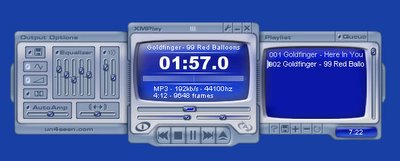
Description : A small packaged audio player that does not need any installation to run, so that you can easily bring with you on a portable drive an audio player that readily supports most-used audio file formats. One can either choose the minimized "capsule" look or the full app window, which shows the playlist on the right and audio output setup on the left (equalizer, balance, interpolation, ramping, etc.). Play around with XMPlay functions inside the "Options and Stuff page" where you can customize the software according to how you would like it to behave. Included in here are the options: Miscellaneous (track looping, fade out, proxy for streams which by default uses the one set in Internet options, etc.) , Playlist (Random Play, Auto Advance, Stop at the end of queue, etc.) , Integration (to set XMPlay as the default player for file formats it supports) , Titles, Shortcuts, MOD, DSP, Device (Output, Plugins and Skins).

Another cool feature is that you can use XMPlay to capture audio streams by using the WAV writer , LAME and OGGENIC encoders. (This is found inside "Options and Stuff" > Device).

+ + + Download Link + + +

Monday, January 23, 2006

Foxit Reader : Portable PDF Reader

Developer : Foxit Sotware
License : Free
OS : Windows 95/98/NT/2000/XP/2003
Download size : 1.11 MB for Setup file / 1.10 MB for Zipped executable

Description : A compact PDF reader that definitely loads faster than Acrobat Reader, and enables the user to view and print .pdf files. Lets you carry ,together with your e-books, a reliable viewer.

+ + + Download Link + + +

Sunday, January 22, 2006

SIW : System Info for Windows

Developer : Gabriel Topala
OS : Windows 95 (SP1, OSR2), Windows 98 (SE), Windows Me, Windows NT 4, Windows 2000, Windows XP, Windows 2003, Windows 2003 R2, Windows Vista, Windows Longhorn Server
License : Free

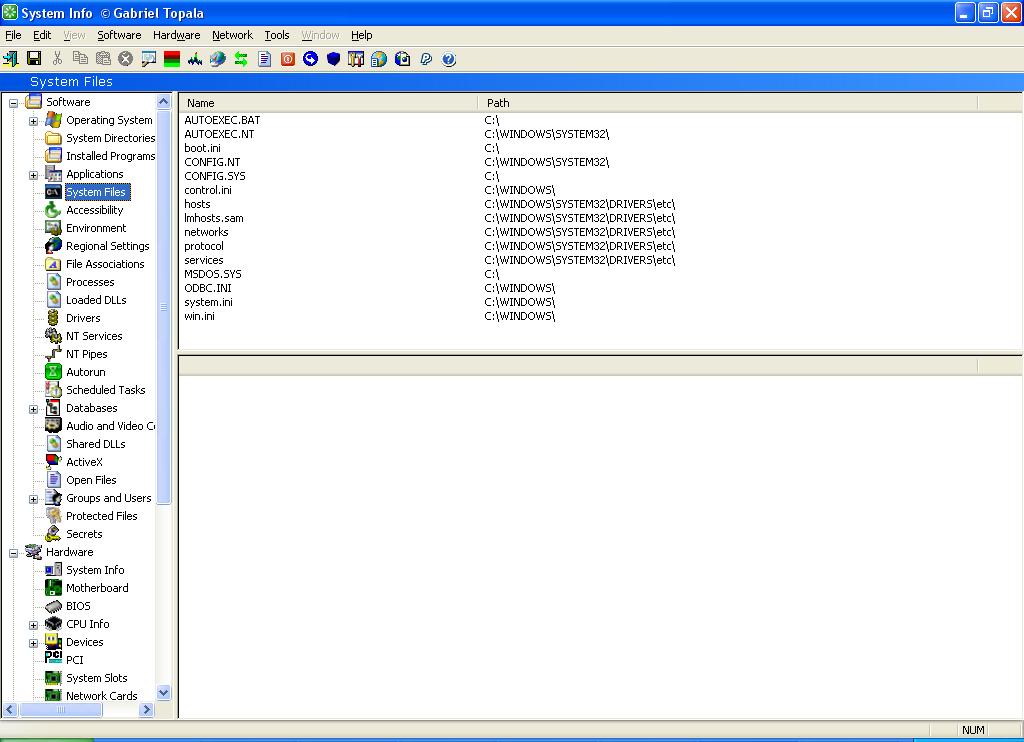
Description : SIW is a free standalone tool that gathers and displays a detailed account of the software and hardware installed on a machine running Windows 95 and up. This includes the following:

Motherboard, BIOS, CPU, devices, memory, video, disk drives, ports, printers, operating system, installed programs, processes, services, serial numbers (CD keys), users, open files, system uptime, network, network shares, etc.

Also included in the exe file are tools such as:

  1. Eureka! - enables you to see the passwords hidden beneath asterisks.
  2. MAC address changer
  3. Windows 9x password cracker
  4. OpenGL test
What's great about this software ?
  1. It's free!
  2. Gives detailed information about installed devices, (It even shows hard drive temperature and seek time).
  3. Quick access to serial keys via the "secret" option. (Software > secret) Though a visit through the registry will reveal these "secrets", it is good to have it done automatically.
  4. Executable file with the size of 1.2 Mb, can run from a USB thumb drive or a floppy.
  5. Eureka! password revealer. (Will only work with asterisk hidden passwords)
+ + + Download Link + + +