
Friday, November 02, 2007
A year after
Tuesday, October 10, 2006
Will Google regret buying YouTube?
Yes, the inevitable has occurred, YouTube has been bought by Google. No one ever really wanted YouTube to die of capital starvation, which at the reported cost of its bandwidth expenses alone amounted to a few months of survival. And with no concrete signs of immediate monetization besides Google Adsense, YouTube was definitely on its way to be listed as one of the first casualties of the "new Web economy". Fortunately, Google saw a future in You Tube that merited a $1.65 billion deal, an amount that is the largest in Google's acquisitions. Now, back to the question, will Google regret buying YouTube? Here are my points:
- Google had a chance (or not?) to capture the same market with their Google Videos, but the traction probably was slow enough that they decided to just buy the brand of "YouTube". The community behind YouTube was the X factor, that part of the equation that other video sites could not or are trying to equal. And so they were actually buying the brand and the loyal community behind it.
- $1.65 billion dollars. Wow. That's a big investment for a company that is all potential and has no track record for earning. Long term investment? Probably not a good one if the progression of the Web is to be followed....if YouTube does succeed in monetizing, it has to innovate and reinvent itself to be able to get back even a small amount of the current buyout price.
- Will Google turn YouTube into a paid video download site, where you can still view sneak peeks of movies and purchase those that you like. Those videos that users upload will for surely remain as a staple feature for the community, and remember, YouTube technically owns anything that you upload. A small price for free hosting.
- The monthly expenses for YouTube's bandwidth is not a small thing, remember Yahoo's acquisition of Flickr? Well, they are definitely not monetizing through it, and need to shell out the money for keeping Flickr afloat.
Well, Google may have a plan up its sleeves, I just hope that their magic rubs off on their new acquisition, YouTube.
Tuesday, September 26, 2006
"Registry editing has been disabled by administrator"
Situation : You are logged in as an admin, but this message still appears when you try to access the Windows Registry Editor. This could happen for a number of reasons ( the last time I encountered it was after a WGA update).
What you can do:
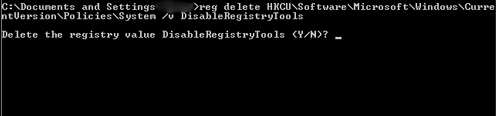
- Open a command window (Start > Run > cmd)
- Type in the following and press Enter :
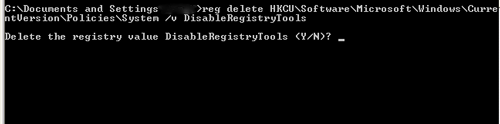
reg delete HKCU\Software\Microsoft\Windows\CurrentVersionPolicies\System /v DisableRegistryTools - Type "Y" and press Enter when it asks you to confirm the action.
- Close the command window, and try opening the registry editor again.
Friday, September 22, 2006
USBCELL : USB-rechargeable AA batteries
 Not much "new" developments on battery technology have been made in the last few years, besides using new materials to achieve better or longer performance for our multitude of gadgets.Thus, when I saw the announcement for a USB-rechargeable battery, I thought : "why didn't this come sooner". It was an idea that was just ripe and ready, and with USBCELL's AA batteries , the timing couldn't have been much sweeter.
The USBCELL AA battery acts and looks like a normal rechargeable battery, but instead of using a separate charger, you just need to plug it into a USB port and charging occurs effortlessly. With most us having direct access to PCs that have USB ports, the hassle of bringing a charger is avoided. The capacity of USBCELL is 1300mAH and full charge is achieved after 5 hours of being connected to a powered USB port.
Links:USBCELL website
USBCELL FAQ
Thursday, September 14, 2006
Microsoft Security Updates for September 2006
Tuesday, September 12, 2006
The New Apple iPod shuffle: world's smallest music player
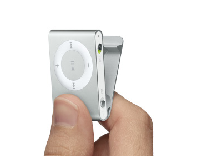 The new Apple iPod shuffle packs 1 GB of flash memory for only $79, and offers the portability of a matchcase. The new shuffle has a clip at the backside that makes it easy to carry, just slip on the clip to a shirt pocket and you're all set to go.
The iPod Shuffle page
Tech Specs page
Thursday, June 15, 2006
Removing Startup Items
Many of the bothersome issues that we have are caused by unwanted programs running at startup. Many applications would automatically configure itself to run whenever you turn on your system, and they are not just annoying, but they also take up memory that should be allocated somewhere else. Also, malware or spyware could also insert their own startup entry so that they could run together with your other startup items. Here are the ways to remove startup items in Windows.
1. Removing Programs in the Windows Startup Folder
Click on Start > All Programs > Startup Folder
Simply delete the items or programs that you want to prevent from starting up. You can also manually find the folder, just to be sure nothing is hidden. To open the folder, got to C: (or where your OS is installed) > Documents and Settings > All Users > Start Menu > Programs > Startup .
Look at the contents and delete what you know is unnecessary.
2. MSCONFIG
The Systems Configuration Utility is another place you need to visit make sure that the only programs running at startup are the ones you know acknowledge.
Again click on Start > Run. Type MSCONFIG at the Run box and press ENTER. The System Configuration Utility should open up. Select the STARTUP tab, and go throughout the list of Startup items. Uncheck those that you don't want to run at startup.
The entries in MSCONFIG may differ from the real names of applications. You might want to open windowsstartup.com and use their knowledgebase to search for the different startup items that you have.
Simply uncheck those unwanted entries and click on Apply and OK out of MSCONFIG. A restart would be asked for, if you're not doing anything else, just say Yes.
3. REGEDIT
The last resort would be to manually find the programs' entries on the registry. To access the Registry, just open another RUN box and type REGEDIT. On the Registry Editor, click on the plus (+) sign next to HKEY_LOCAL_MACHINE > SOFTWARE > MICROSOFT > WINDOWS > CURRENTVERSION > RUN. On the right panel, select the entry for the program and just delete it. Also look at the following location : HKEY_CURRENT_USER > SOFTWARE > MICROSOFT > WINDOWS > CURRENTVERSION > RUN.
Reminder: Be careful in editing or modifying the registy as it may cause you OS to be inoperable or other weird things to happen.
Happy Hunting!